

On this page+
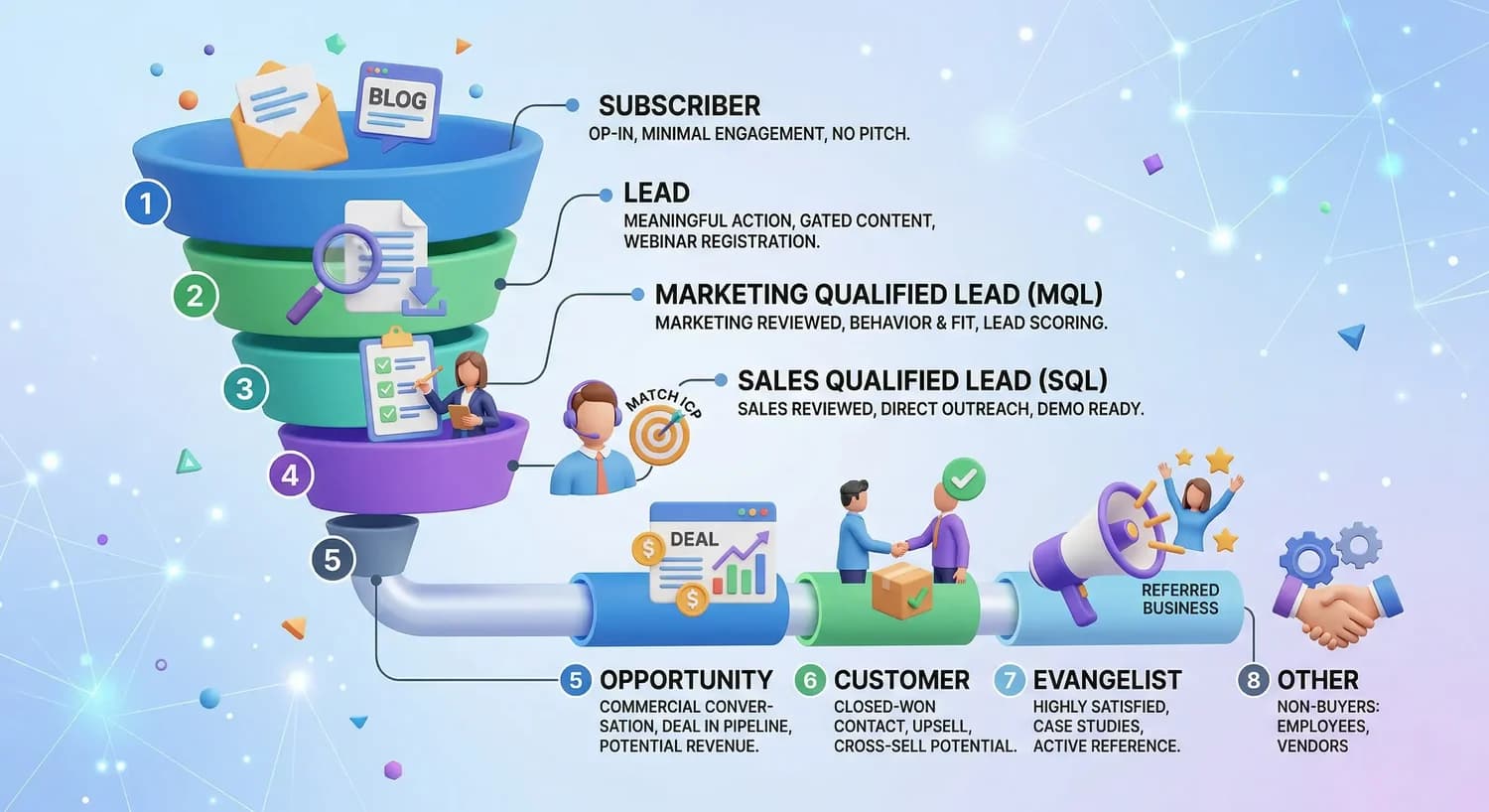
HubSpot lifecycle stages are a CRM property that shows where each contact sits in your customer journey, from first contact to loyal customer. HubSpot ships with eight default stages: Subscriber, Lead, MQL, SQL, Opportunity, Customer, Evangelist, and Other, and you can customize them to match your sales process.
If you’ve just logged into HubSpot for the first time, you’ve probably noticed a property called “Lifecycle Stage” sitting on every contact record. It’s easy to skim past it. Don’t.
This one property quietly powers a lot of what makes HubSpot useful: your workflows, your funnel reports, and the handoff between marketing and sales. Get it wrong (or ignore it) and your reporting turns into guesswork. Get it right and everyone on your team can answer the same question the same way: where is this person in their journey with us, and what should happen next?
What Is a HubSpot Lifecycle Stage, Exactly?
The Lifecycle Stage property is a native field in HubSpot that tracks where a contact or company sits in your customer journey, starting from the first time you interact with them and continuing through purchase and beyond. Every single contact and company record in your HubSpot account carries this property, whether you’ve configured it or not.
Think of it as a label that answers one question for your whole team: what milestone has this person actually crossed? It’s not meant to track daily busywork. It’s meant to mark the big, meaningful transitions in a relationship, like when someone stops being an anonymous website visitor and becomes a real sales opportunity.
Properly configured lifecycle stages aren’t just cosmetic labels. They let your team segment contacts, personalize outreach, trigger automated workflows, and build pipeline reports that actually mean something. Skip the setup work and lifecycle stages become metadata that nobody trusts, not intelligence you can act on.
The 8 Default HubSpot Lifecycle Stages Explained
Out of the box, HubSpot gives you eight stages: Subscriber (opted into your communications, no buying intent yet), Lead (took a meaningful engagement action), MQL (marketing has qualified them as sales-ready), SQL (sales has verified them against your ideal customer profile), Opportunity (there’s a formal deal with a dollar value attached), Customer (closed-won), Evangelist (an active referral source or case study participant), and Other (for contacts who will never be customers, like vendors or job applicants).
Here’s what each one actually means in practice.
Subscriber. Someone who opted in to hear from you but hasn’t shown any real purchase intent yet. Newsletter signups, blog subscribers, and podcast registrants typically land here. Don’t try to sell to this group. Nurture them with useful content instead.
Lead. A contact who has expressed some interest by filling out a form or downloading a resource. They’ve identified themselves, but they haven’t yet met your bar for marketing qualification.
Marketing Qualified Lead (MQL). A contact who meets the behavioral and fit criteria your team defined as “ready for sales outreach.” Here’s the catch: there’s no universally agreed definition of MQL across companies, and HubSpot doesn’t apply this stage automatically. Most teams treat an MQL as someone marketing is comfortable handing to sales.
Sales Qualified Lead (SQL). This is where a sales rep has personally made contact and confirmed the lead is worth pursuing. Some teams formalize this with BANT criteria (Budget, Authority, Need, and Timeline) before moving someone into SQL. Like MQL, HubSpot leaves the exact definition up to you.
Opportunity. By default, HubSpot automatically applies this stage the moment an associated deal record gets created. You can also apply it manually if you want to flag someone as an opportunity before a deal exists.
Customer. Once a deal tied to that contact gets marked Closed Won, HubSpot moves the contact to Customer automatically.
Evangelist. Reserved for customers who’ve moved past satisfaction into advocacy: think referrals, testimonials, or case study participation. This and Customer both sit in what’s often called the retention or advocacy phase of the journey.
Other. A catch-all for contacts who will never become customers, regardless of stage.
Lifecycle Stage vs. Lead Status: What’s the Difference?
This trips up nearly every new HubSpot admin. Lifecycle Stage answers “where is this person in the overall journey?” Lead Status answers a narrower question: “what’s happening with them right now, today, within that stage?”
For example, a contact moving from Lead to MQL is a lifecycle stage change. Whether that same MQL has been “Attempted to Contact” or is “In Progress” with a rep is a lead status change. Mixing the two up is one of the most common reasons HubSpot reporting ends up unreliable. Lifecycle Stage should track milestones, not your rep’s daily to-do list.
Can a Contact Move Backward in Lifecycle Stage?
Not automatically, no. HubSpot’s built-in lifecycle stage automation is designed to move contacts forward, not backward, so a closed-lost deal won’t quietly demote someone from Opportunity back to Lead on its own. If you want that kind of downgrade to happen, a rep has to do it manually, or you need to build a workflow specifically for it.
Honestly, most teams never bother building that backward workflow, and their reporting suffers for it. If your “Opportunity” count is padded with dead deals from six months ago, nobody trusts the funnel numbers anymore. Worth fixing early rather than discovering it during a board meeting.
Should You Customize the Default Stages?
Probably, eventually, but not on day one. Custom lifecycle stages make sense when your actual sales process has a distinct step the defaults just don’t capture, like a formal technical evaluation or a pre-renewal check-in. The tradeoff is real: too many custom stages make the CRM harder to manage and explain to new hires.
A reasonable starting point most consultants agree on: keep Lead, Opportunity, and Customer as HubSpot defines them, since those map cleanly to almost any business. Don’t feel obligated to force Subscriber, MQL, SQL, or Evangelist into your process if they don’t fit your motion. You can always add them back later.
Pro tip: before you touch any stage settings, write down a one-sentence definition for MQL and SQL that both marketing and sales sign off on. Verbal agreements that each team interprets differently are one of the most common causes of marketing-sales misalignment, and it’s a lot cheaper to fix on a whiteboard than inside a broken workflow.
A Quick Checklist for Setting Up Lifecycle Stages
- Go to Settings, then Objects, then Contacts in your HubSpot navigation.
- Click the Lifecycle Stage tab to see your default stages listed in order.
- Write a one-sentence, specific definition for every stage, especially MQL and SQL.
- Get sign-off from both marketing and sales leadership on those definitions.
- Decide which default stages you’ll actually use and turn off or delete the rest.
- Add custom stages only for distinct steps your process genuinely needs.
- Build (or confirm) the workflow that moves Closed Won deals to the Customer stage.
- Set up a funnel report so you can watch conversion rates between stages monthly.
One useful sanity check once you’re live: for a mid-market B2B company, a reasonably healthy funnel might look something like 100,000 Subscribers narrowing down to 20,000 Leads, 2,000 MQLs, 600 SQLs, 400 Opportunities, and 120 new Customers in a quarter. If the ratio between any two adjacent stages looks inverted, like more SQLs than MQLs, that’s usually a data problem, not a sign you’re crushing it.
Frequently asked
Do I have to use all eight default lifecycle stages?
No. Plenty of companies skip Subscriber, Evangelist, or Other entirely because those stages don’t map to how they actually sell.
What triggers HubSpot to move a contact to Customer automatically?
HubSpot moves a contact to Customer once a deal associated with them is marked Closed Won.
Is MQL the same across every company?
Not even close. There’s no universal definition of MQL, and HubSpot doesn’t apply it automatically, which is exactly why your marketing and sales teams need to agree on your own criteria in writing.
Can a lifecycle stage move backward if a deal falls through?
Not on its own. HubSpot’s default automation only moves stages forward, so you’d need a manual update or a custom workflow to send a contact back down the funnel.
What’s the difference between Lifecycle Stage and Lead Status?
Lifecycle Stage tracks big-picture milestones in the customer journey. Lead Status tracks the day-to-day activity happening inside a single stage, like whether a rep has reached out yet.

CEO & Founder at Revlyn. Part of the team that builds and operates HubSpot portals day to day.