

On this page+
HubSpot Free vs. Starter vs. Professional: Which Tier Do You Actually Need?
If you’ve spent any time on HubSpot’s pricing page, you know the feeling. Three tiers, a handful of “Hubs,” per-seat math, and a nagging suspicion that you’re either about to overpay or about to get stuck two months in.
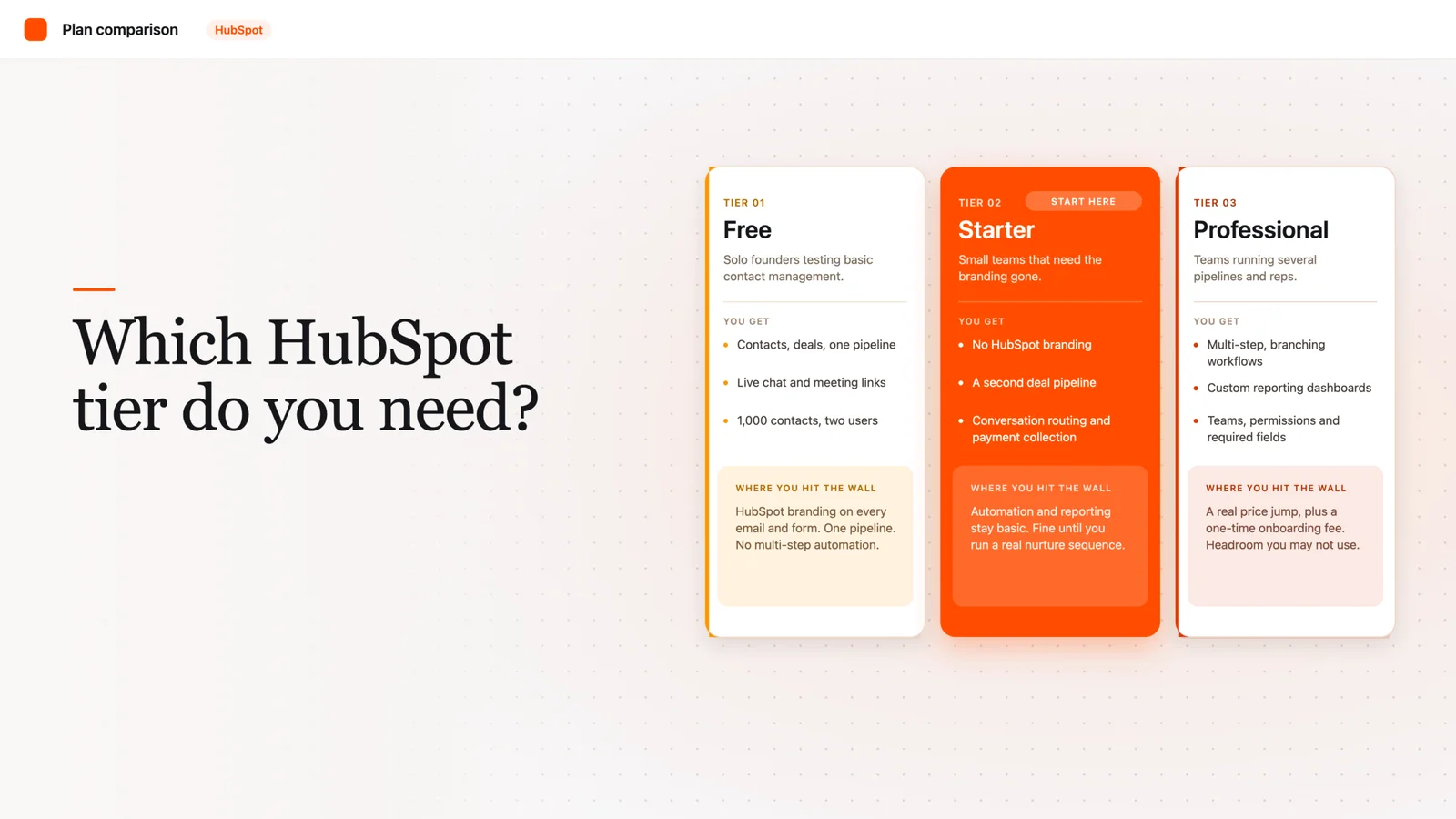
HubSpot Free works for solo founders testing basic contact management. Starter (around $20/seat/month) fits small teams that need automation basics and no branding. Professional ($100+/seat or $890/month for Marketing Hub) suits teams that need multi-step automation, custom reporting, and multiple pipelines.
That’s the short version. But the real answer depends on where your team actually gets stuck day to day, not on some abstract “company size” bracket. Let’s walk through what each tier really includes, so you’re not guessing.
What’s actually different between the three tiers?
A “tier” in HubSpot just means a package of features tied to a price point. You can mix tiers across different Hubs (Marketing, Sales, Service, Content, Operations), which is part of why the pricing page feels confusing.
At a high level: Free gets you in the door with core CRM functionality. HubSpot’s free CRM includes up to two users and 1,000 contacts, with no limits on how long you can use it and no expiration date. Starter removes HubSpot’s branding from your emails and forms and adds early automation. Professional is where real workflow automation, custom reporting, and team management features live.
What do you actually get with HubSpot Free?
Free is a genuinely usable CRM (a system for tracking your contacts, companies, and deals in one place), not just a stripped-down demo. You get contact and deal records, basic pipeline tracking, live chat, and meeting scheduling at no cost.
But it has real ceilings. You’re capped at two users and 1,000 contacts. You only get one deal pipeline (the stages a deal moves through, like “Prospect” to “Closed Won”), so if you run more than one sales process, say new business versus renewals, you’re already boxed in. There’s also no multi-step workflow automation on Free; you can trigger a single follow-up email off a form fill, but you can’t build a branching sequence.
Every outward-facing piece of Free, your emails, forms, chat widget, and meeting links, carries HubSpot’s branding. For a two-person team testing the waters, that’s a non-issue. For a team fielding client questions about “what CRM are you using,” it starts to feel unprofessional.
What does Starter add?
Starter is priced around $20 per seat per month and is really the first “real” paid tier. It removes HubSpot’s branding and unlocks a second deal pipeline, so you can finally separate two different sales motions.
On the sales side specifically, Starter adds conversation routing (automatically directing incoming chats or emails to the right rep), built-in payment collection, unlimited email notifications, and a set amount of calling minutes per account each month. It also introduces custom properties and task queues, small but meaningful upgrades if your team has outgrown default fields.
Honestly, Starter is the tier most early-stage teams should be evaluating first, not Free and not Professional. It’s cheap enough to try without a real budget conversation, and it removes the two limitations (branding and single pipeline) that trip people up fastest.
What does Professional unlock?
This is where the price jump gets real. Sales Hub Professional runs about $100 per seat per month, while Marketing Hub Professional starts closer to $890 per month. Professional tiers also typically carry a one-time onboarding fee, roughly $1,500 for Professional plans, separate from your monthly subscription.
What do you actually get for that? Multiple deal pipelines with more flexibility, required fields (so reps can’t skip critical data entry), Teams (for organizing larger sales orgs with permissions), advanced views, and significantly more calling minutes per rep each month. Professional also connects to Salesforce if you’re running a hybrid stack, and it’s the tier where custom reporting and true multi-step automation live.
Here’s the honest take: most teams don’t actually need Professional because of one flashy feature. They need it because Starter’s automation and reporting genuinely can’t support a sales or marketing motion with more than a couple of pipelines and reps. If that’s not you yet, you’re paying for headroom you won’t use for a year.
A quick self-check: which tier do you need?
Run through these questions before you commit to a plan:
- How many people need CRM access today? More than two, and Free is already off the table.
- Do you run more than one sales or marketing process? If yes, you need at least Starter’s second pipeline.
- Does your team need multi-step automation (like a five-email nurture sequence triggered by behavior, not just one follow-up)? That’s a Professional-level need.
- Do you need custom reporting dashboards for leadership, not just default views? Professional territory.
- Is branding on your customer-facing emails and forms a dealbreaker? If yes, skip Free entirely.
- Can you absorb a one-time onboarding fee on top of monthly seats? If not, stay on Starter until you can.
Pro tip: don’t buy Professional across every Hub at once just because you need it in one. Most teams only need Professional-level automation in Sales or Marketing, not both, at least in year one. Buying it everywhere just because the bundle looks tidy is how budgets balloon.
Frequently asked
Is HubSpot’s free CRM actually free forever, or is it a trial?
It’s genuinely free forever, no expiration date and no credit card required for the core CRM. The catch is the two-user and 1,000-contact caps, not a hidden time limit.
Can I mix tiers across different HubSpot Hubs?
Yes. You could run Sales Hub Professional while staying on Marketing Hub Starter, and plenty of teams do exactly that to control cost.
Does upgrading from Starter to Professional include onboarding help?
Professional plans typically carry a one-time onboarding fee separate from your monthly subscription. That fee covers setup support, but it’s mandatory in most cases, not optional white-glove service.
What’s the single biggest reason teams outgrow Starter?
Automation. Starter gives you light, single-step automation, but the moment you need branching workflows based on contact behavior, you’re looking at Professional.
Should a two-person startup ever start on Professional?
Rarely. If you’re testing a motion, not scaling one, Free or Starter almost always makes more sense until your process is proven.

Part of the Revlyn team that builds and operates HubSpot portals day to day.